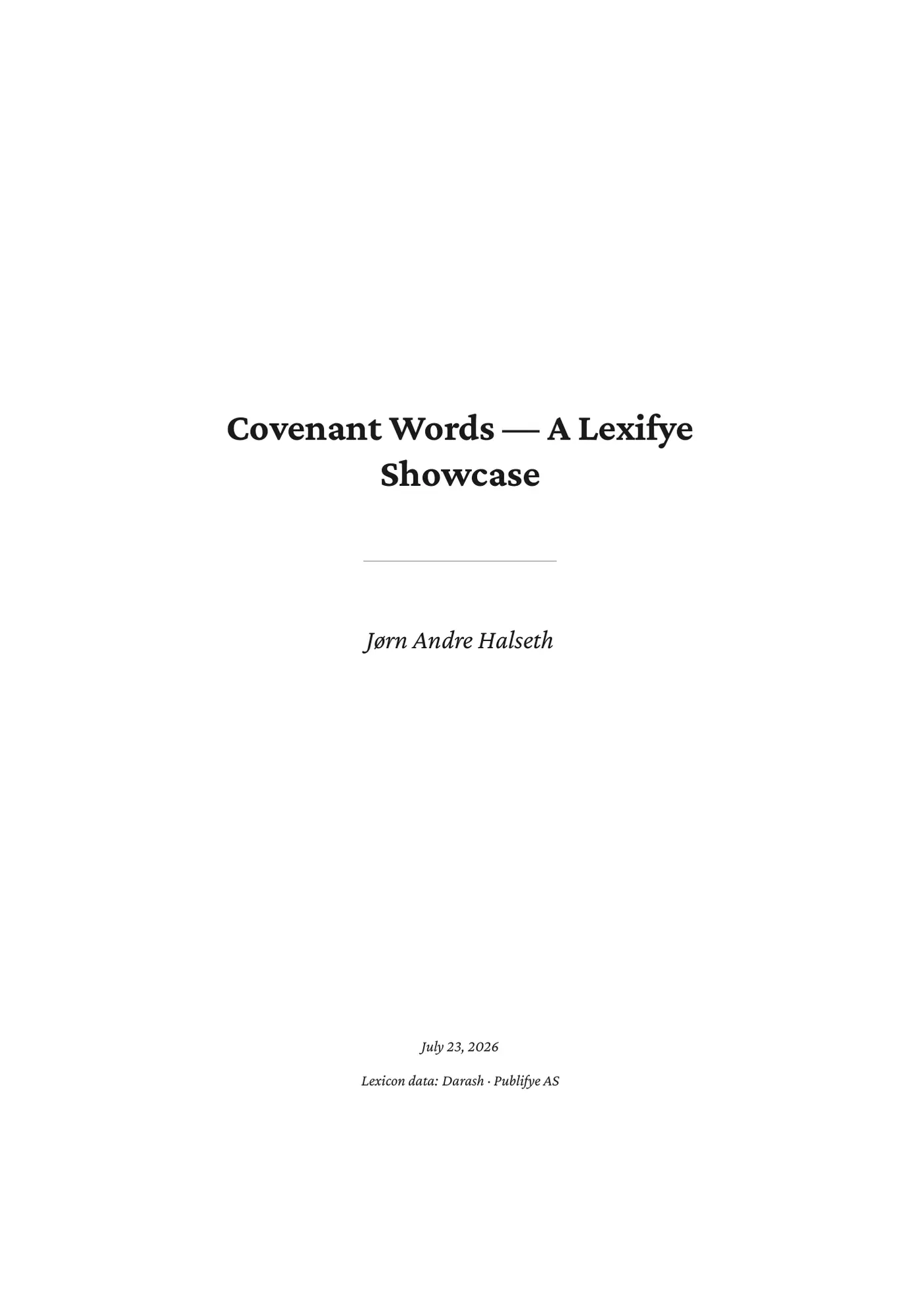
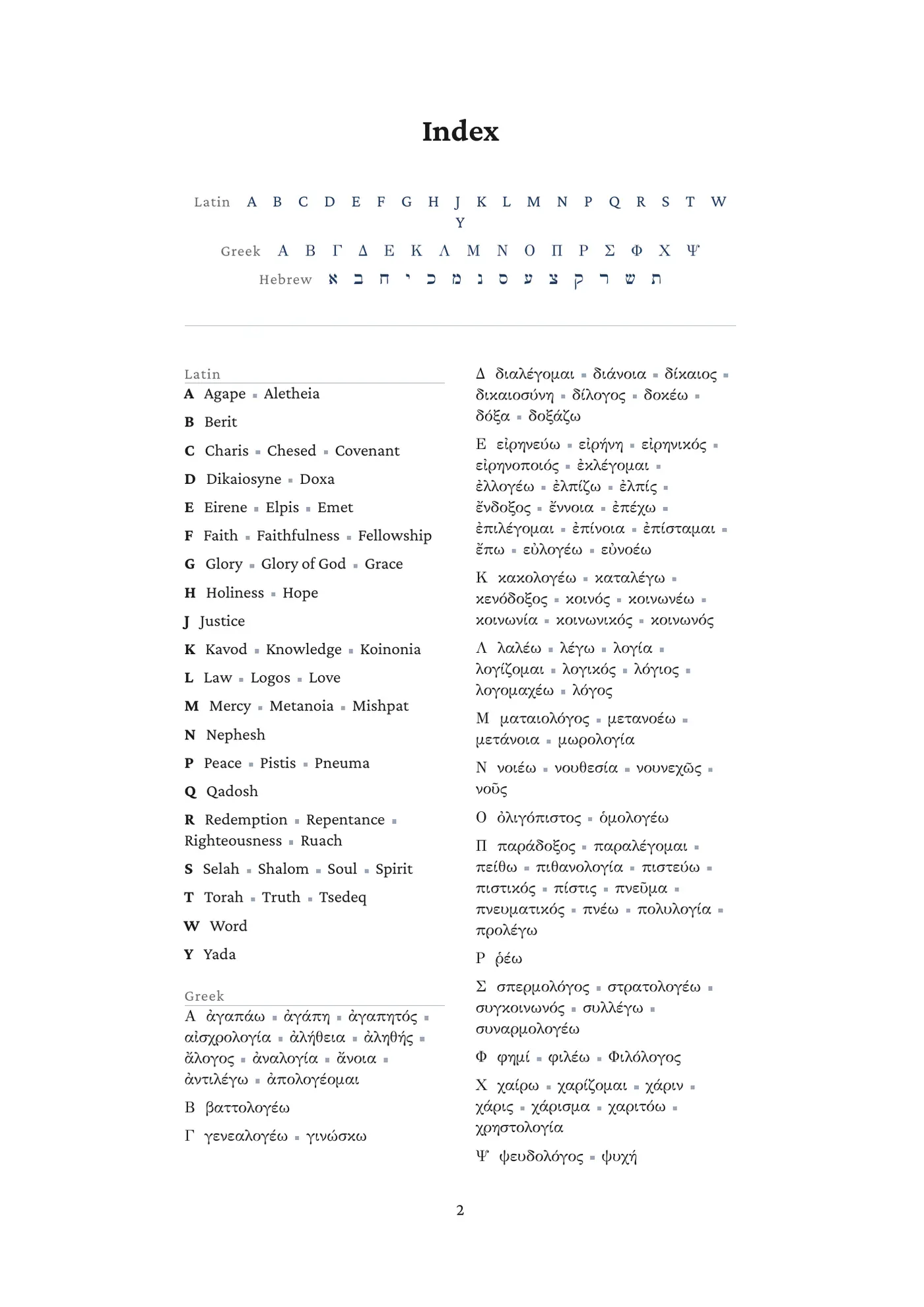
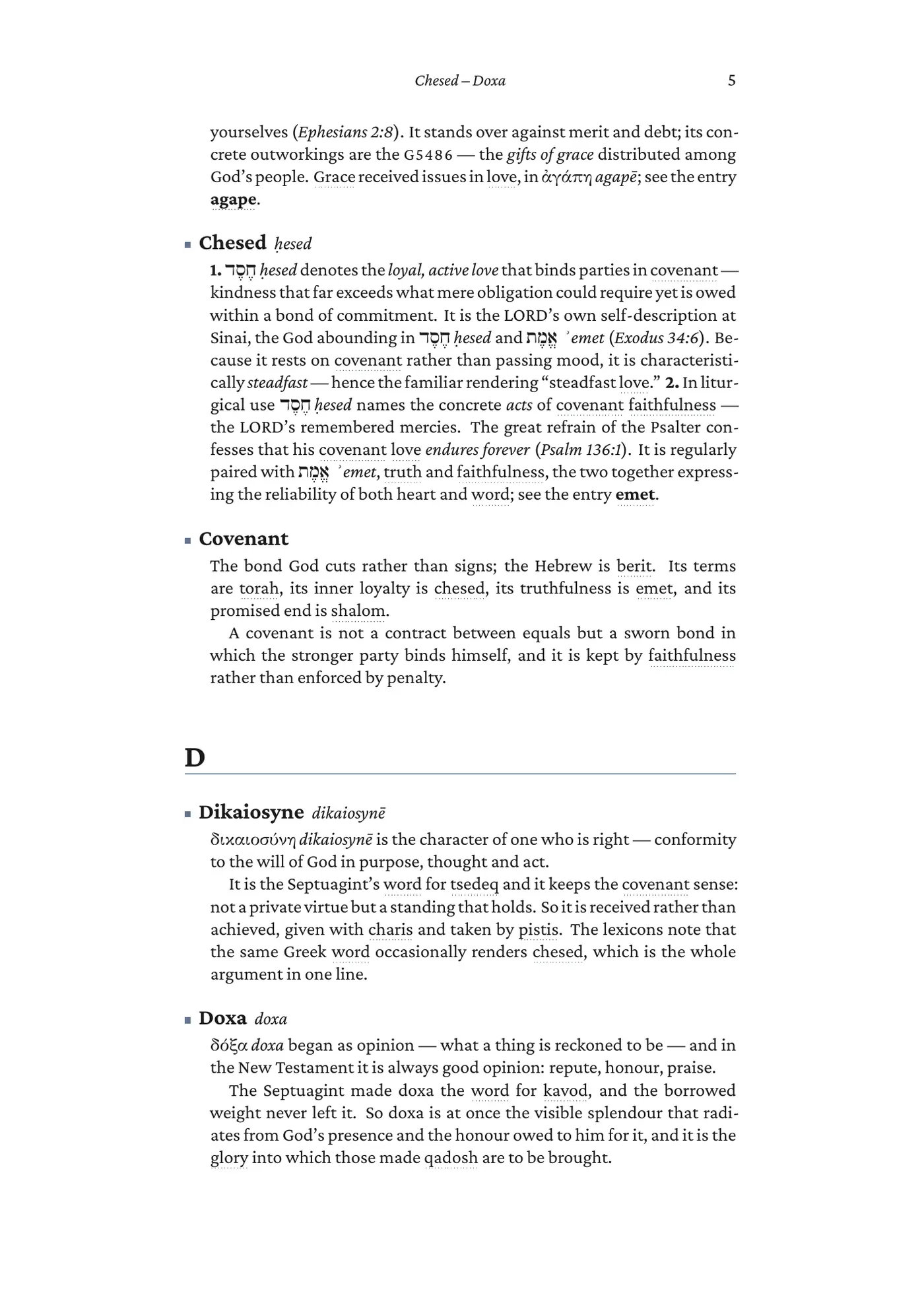
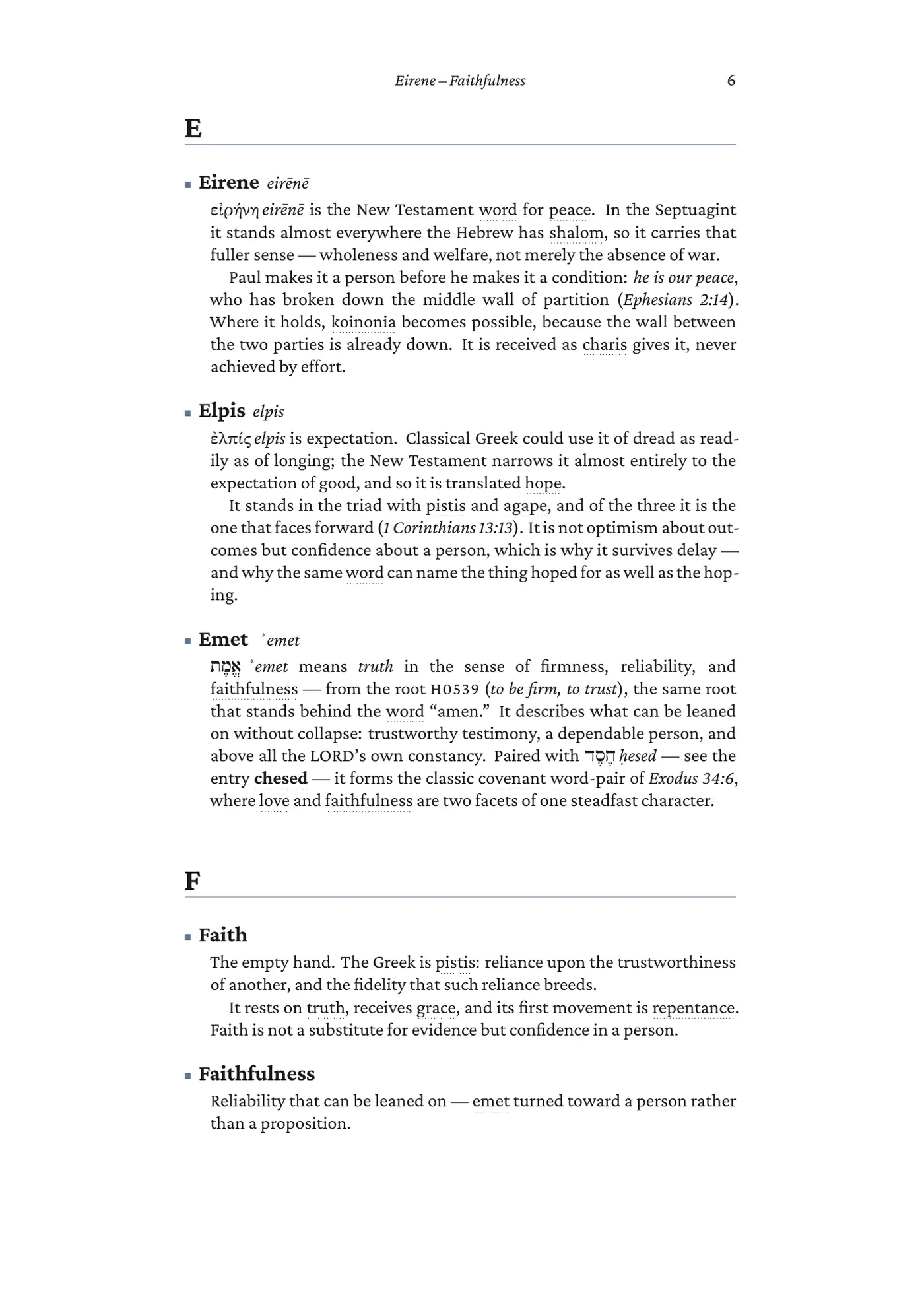
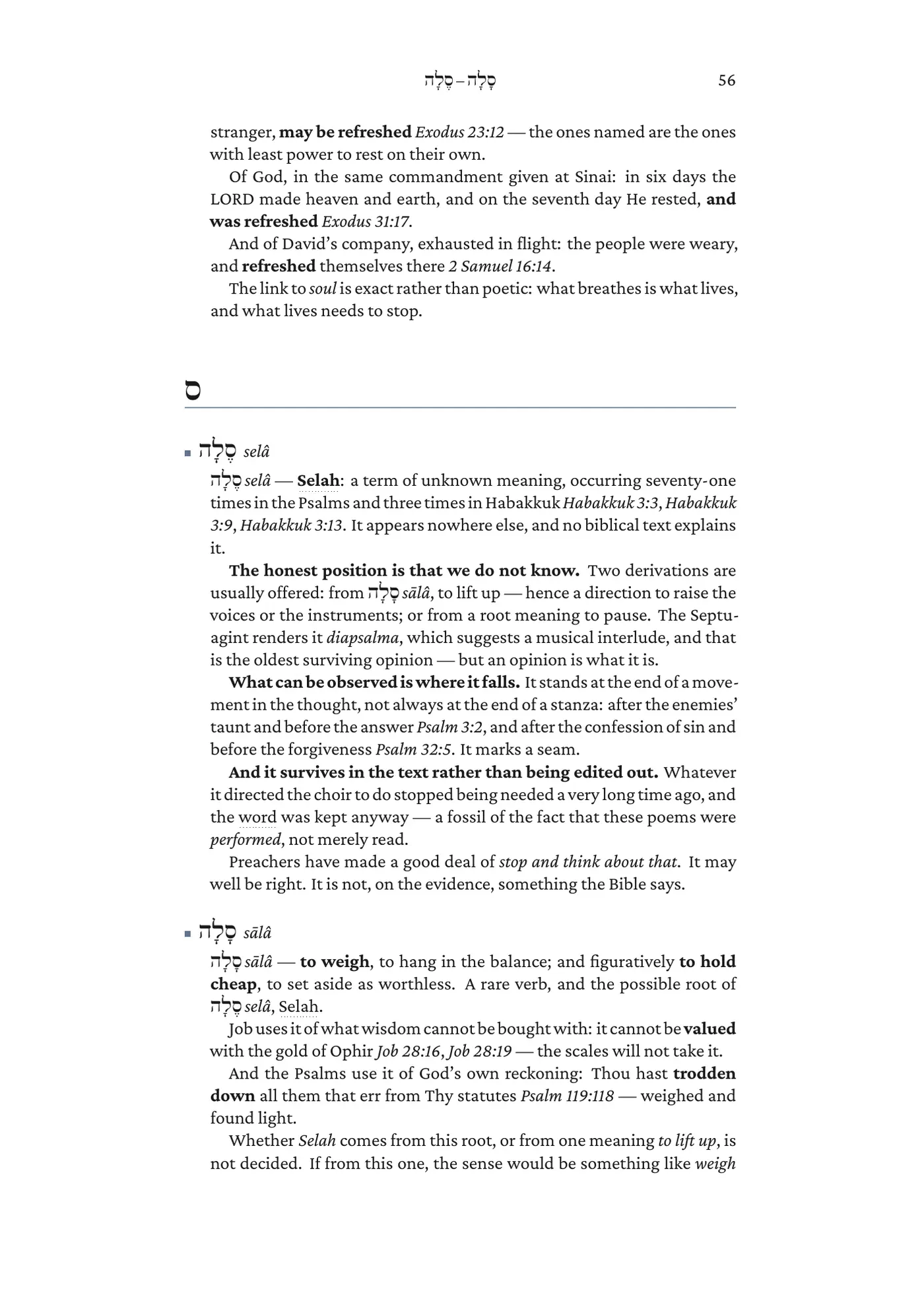
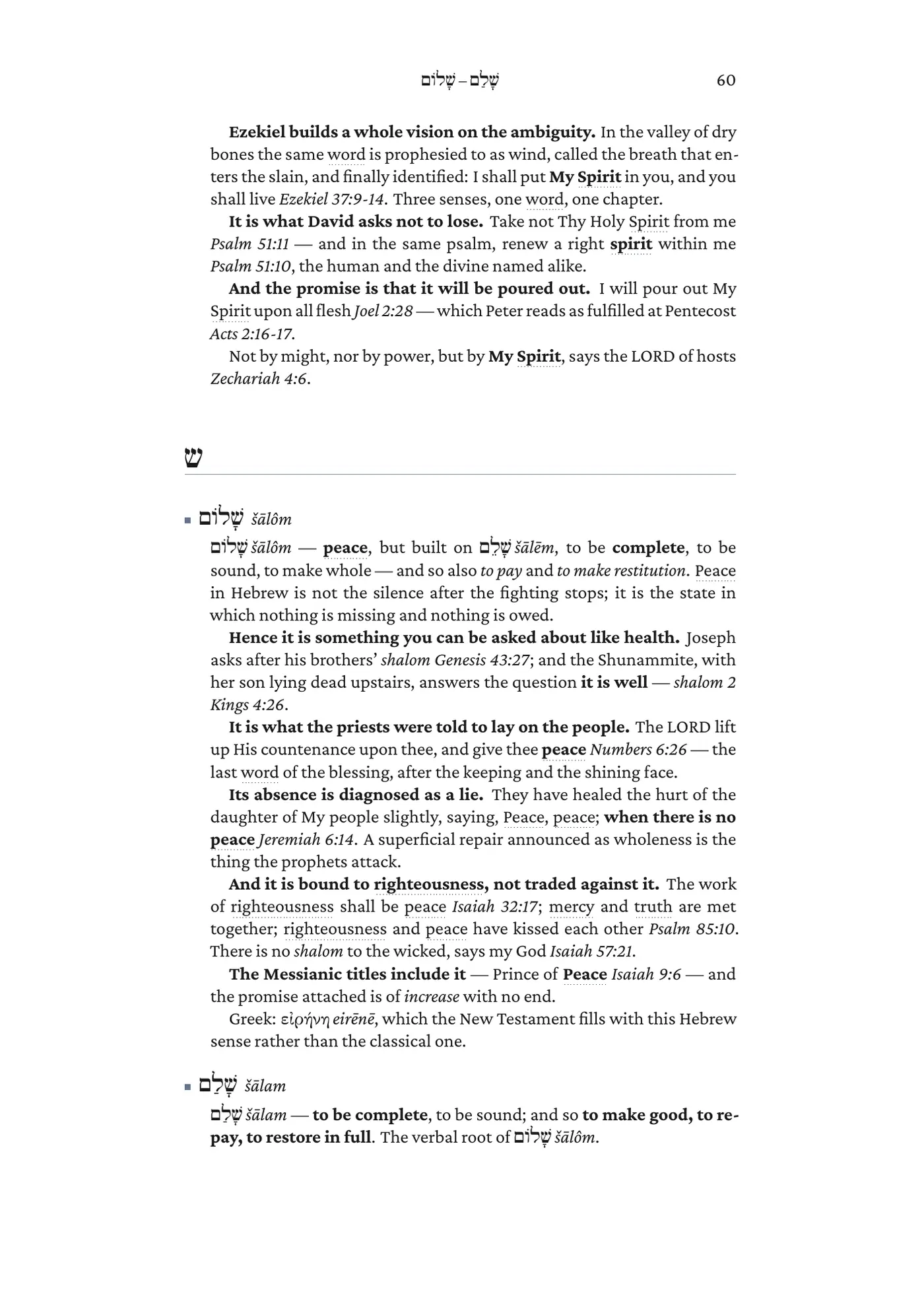
Not a mock-up — the actual PDF Lexifye typeset from 168 entries, the same way it will typeset yours. Hebrew and Greek in their own faces, transliteration beside the lemma, every word that has an entry of its own quietly linked to it, and a full index at the back.
The same entries also become an EPUB, a reader that works on a phone, and a 6×9 interior ready for a printer. You write once.
A word-study dictionary, set by Lexifye: Hebrew and Greek in their own faces, a transliteration beside every lemma, Scripture cited where the word is used. Here is one entry, chosen at random — and the whole book beside it.
N
Covenant Words — A Lexifye ShowcasePicked at random
Nephesh
nepeš
נֶפֶשׁnepeš is the living self — that which breathes, and so the whole person seen from the inside. It is not a part of a person set over against the body but the person alive: appetite, desire, emotion and will together.
Where ruach is the wind that moves upon a person, nephesh is the life that results, and the two are near neighbours throughout the Hebrew Bible. A nephesh can hunger, can be bound in covenant, can be poured out. To love God with all the nephesh is to love him with the whole appetite of the self, and it is with the nephesh that a person comes to yada him at all.
Set by the same engine that typeset the book.
01
Make it yours
A home for your words, definitions, and the sources behind them.
02
Let it grow
Keep adding what you discover. Your study becomes something lasting.
03
Put it in print
From your desk to a printed dictionary, an EPUB, or a shared reader.
A study tool and a press, in one package
The same dictionary comes out in seven shapes, from one press, every time you ask:
ReaderHTML — it works on a phone
PDF lightthe screen copy, on white
PDF darkthe same, for reading at night
Print 6×9″an interior a printer accepts
EPUB3for an e-reader or a phone
JSONthe whole dictionary, structured
LaTeXthe source, if you want it
Explore everything Lexifye can do↗
Most study software stops at the note. The note is where the work usually dies — readable by you, on one machine, in a format nobody else can open. Lexifye treats the entry as publishable content from the first keystroke: structured senses, typed spans, real scripts. So the step from "my notes" to "a book with a spine" is a render, not a rewrite.
A dictionary here stands entirely on its own — you never have to write a book to get the good of it. But if you do, it becomes something more.
Lexifye is where you build your own dictionary: the words you keep meeting in the text, what you found in them, and why it mattered. Look one up today and it is still there in five years — with everything you have added since. When it is ready to leave your desk, the same entries become a printed book, an EPUB, or a private reader you share with a study group or a whole congregation.
There is a real pleasure in this that nobody warns you about. A dictionary you wrote yourself is not a chore you maintain — it is the most enjoyable thing on your desk, because every entry is a small victory you get to keep. Ten words become thirty; the thirty start talking to each other; and one morning you realise you are reading with something no study Bible could have handed you, because you built it.
Sign in once from Claude, DeepSeek or your own agent, and it writes entries into your dictionary on your behalf — under your name, and revocable from the same page.
Building with an AI? The tool surface is the manual, written to be read by a machine: 94 tools, each with its access level and full schema, plus the authoring conventions and the markup grammar. You do not need any of it to use the web editor.
Why build or join in on a dictionary at all
Because the looking-up is not the study. Anyone can find that hesed is "steadfast love" — and find it again next year, and the year after, having kept nothing. The study is what you noticed the fourth time you met the word, in a passage nobody told you to connect it to.
A lexicon of your own is where that accumulates. Every entry holds your senses, in your words, with the references that convinced you. The Hebrew and Greek you cite become real entries themselves — native script, transliteration, a composed gloss drawn from our scripture engine — so a word you half-knew in March is a word you can teach from in October.
You do not need Greek or Hebrew to start, and you do not need to be a programmer to use it: it is a web editor you sign into, and the original-language work is done for you when you cite a word.
Sunday comes every week, and the same words come with it. Build the entry once — the sense you settled on, the passages that decided it, the reading you rejected and why — and every later sermon starts from where the last one finished instead of from a blank page.
The evangelist
The questions repeat: what does that word actually mean, where else does it occur, why do translations differ. Keep the answers where you can find them under pressure, and print the ones you give most often as a small book to leave behind.
The missionary
Working between languages is dictionary work whether you call it that or not. Sixteen scripts typeset properly — Hebrew, Greek, Arabic, Devanagari, Ethiopic and more — so the glossary you are building for a field team is publishable, not a folder of notes that only renders on your own machine.
The layman
You read the Bible and you want to go deeper than the footnotes. Start with ten words that keep catching you. In a year you will have something no study Bible could have given you, because it is a record of your own reading.
The student
The words a course keeps using — in a Greek class, in a seminary paper, in a language you are learning — defined in your own words the first time you meet them. Writing the entry is what makes it stick, and it is still there when next year's course asks for the same word again.
The postgraduate
A thesis is three years of the same forty words meaning slightly different things in different literatures. Settle each one once, with your sources and your reasoning attached, and it is still there when you write the chapter that depends on it. Your supervisor can be in it with you.
The teacher or group leader
Give your class the reader and they read what you have written, on a phone, with nothing to sign into. Bring a colleague in as a guest editor on that one dictionary and no other. Take the access back the moment the term ends — membership is checked on every request, so revoking is immediate.
The research team or committee
Several people, one controlled vocabulary, one audit trail. Attach the group once and everybody is in; the terminology stops living in six sets of private footnotes and starts living in one place everyone writes to.
The translator or scholar
Structured senses rather than a blob of prose, exact version history with diff and revert, and an audit trail per dictionary. The work survives collaborators, second thoughts and years.
Nothing in Lexifye knows what your words are about. A dictionary is a list of terms, the senses you gave them, and the sources you trust — and a great deal more than Hebrew and Greek has that shape. This is as much a tool for a school, a faculty or a department as it is for a church, and the shape is identical in both: one person builds it, a few people work on it, and everybody else is handed the finished thing.
A Norwegian–English wordlist for a class is a dictionary: the week's words, a sense a ten-year-old can actually use, an example sentence, and it prints as a handout or reads on a phone. Pair it with next week's text in Junifye and the glossary for that text builds itself — the fourth-graders get the passage and exactly the words it uses, not a generic vocabulary list.
Sixteen scripts are typeset by their own faces — Greek, Hebrew, Arabic, Persian, Cyrillic, CJK, Devanagari, Bengali, Tamil, Telugu, Kannada, Gurmukhi, Ethiopic, Armenian, Thai and extended Latin — three of them right-to-left, with a check before every render that refuses to ship a page of empty boxes rather than printing them. For a languages, classics or linguistics department that is usually the whole question.
The Bible machinery is optional and switches off entirely: set a dictionary's Strong's depth to zero and none of it applies. The same is true of the additives on a food label, the substances in a diet, the terms of a trade, the jargon a field team keeps having to explain. Build it once, keep it for years, hand it to whoever needs it.
One of three — and complete on its own
Three services built to work together, none of which needs the other two. The joins are settings, not dependencies: disconnect any of them and what you made stays yours, stays readable, and keeps rendering.
Both arrows are one-way pulls. Lexifye never writes into Darash, and a Junifye work never edits your dictionary.
Cite H2617 in a definition and Lexifye asks Darash what that is, then writes the answer into your dictionary as a real entry: the pointed lemma in Hebrew script, an SBL transliteration, and a gloss composed from the lexicons — Strong's, Brown-Driver-Briggs, Abbott-Smith, Liddell-Scott-Jones, Thayer. You choose how far it goes: the words you actually cited, one related hop, or deeper on request. Nothing it writes can overrule you — a hand-authored entry always wins a collision.
Turn it off (depth 0) and your dictionary is unchanged; you simply write the original-language part yourself.
Lexifye — where the words live
This service, and the middle of the three by design: it is the system of record for lexical content in the whole ecosystem. A definition is authored here and nowhere else, and everything downstream holds a cache rather than a copy — so when a word changes here, what quotes it is stale by definition and is told so.
It never needs either neighbour: a private lexicon of one reader's study is a finished thing, and it prints.
Point a work at a dictionary and its glossary builds itself on every render: the terms the text uses, plus the terms your own definitions lean on, all the way down until nothing dangles. It records the exact version of each definition it took, down to a checksum — so you can prove what a word meant in the edition someone is holding — and an entry keeps the anchor it was published with, whatever you rename afterwards.
Point it at nothing and it is simply a place to write.
Not one of the three, but next door: build your own Bible with Tringine — choose a translation, the scope and a trim size, and get a print-ready PDF and an EPUB3. All four are made by Publifye AS, a Norwegian publishing house in Oslo (org.nr 826 774 622, founded 2016), which publishes Bibles, builds the tools they are studied with, and runs infrastructure for churches.
One word, all the way through
What actually happens, in the order it happens, with the real text at each step. Nothing here is aspirational — it is the path chesed took through the sample you can download at the top of this page.
You write the definition, and cite the word
In the editor, in ordinary prose, with one tagged span for the Hebrew:
[h:H2617:ḥesed:חֶסֶד] denotes the *loyal, active love* that
binds parties in covenant — kindness that far exceeds
what mere obligation could require.
That is the whole of the markup grammar you need for this. The round trip is exact: what you read back is what every later read gives you.
Lexifye asks Darash what H2617 is
And writes the answer into your dictionary as a real entry — the pointed lemma
חֶסֶד, the SBL transliteration ḥesed, and a gloss composed from the lexicons. It is marked as machine-made, it is capped, and it can never overwrite a word you wrote yourself.
You set how far this goes, from off to deep. Stop citing a word and its auto entry is reconciled away; your own entries are never touched.
The dictionary sets itself
Every occurrence of covenant in that definition becomes a link to the covenant entry, because this dictionary has one. The headword prints with a capital and stays stored as you typed it. It files under C in the letter index, and the index at the back lists every entry, each one a destination and a way back.
A screen PDF in light or dark, a 6×9″ interior with running guide words, an EPUB3, a web reader, JSON — or the raw LaTeX, if you want to take it elsewhere.
A Junifye work takes only what it needs
Write a study of Ruth that uses the word, and its glossary appendix appears with
chesed in it — along with covenant, because your definition of chesed leans on it, and so on down until nothing dangles. The build records the checksum of the exact version it used.
Edit the dictionary afterwards and the book already in print is unaffected: an entry keeps the anchor it was published with.
What the glossary actually does
That last step is the one people ask about, so here it is in full. Connect a Lexifye dictionary to a work in Junifye and the glossary writes itself. Not "export your terms and paste them in" — the work pulls the entries it actually needs, every time it is built. That is true of a full book and equally true of a six-page document: a study of one book of the Bible, a topical study on covenant or atonement or the fear of the Lord, a handout, a paper, a series outline. Same dictionary behind all of them.
It takes only what the work uses. Terms occurring in the text, plus — and this is the part people do not expect — the terms your own definitions lean on. Define
propitiation in terms of hilastērion, and hilastērion comes with it, all the way down until nothing is left dangling.
It links the first mention in each chapter and leaves the rest of the sentence alone, so the prose still reads like prose. In print the link is set plain — the appendix is the reference there, and nothing interrupts the eye.
It records exactly which version of a definition it used, down to a checksum, so you can prove what a word meant in the edition someone is holding.
Editing the dictionary can never break a book already in print. An entry keeps the anchor it was published with, whatever you rename or reorder afterwards.
Your own wording always wins. A term you wrote into the book itself beats the imported one; nothing you authored gets quietly overwritten.
So the fourth thing you write is faster than the first, not slower — because the words are already yours, already defined, already typeset.
Built a word at a time, over months
This is not a project you sit down and finish. It is a thing you add to on a Tuesday because a word stopped you, and again three weeks later when the same word turns up somewhere you did not expect — and the second entry is better than the first because you had both passages in front of you.
That is the whole point, and it is why it has to be yours. A study of Romans that took you a winter, a topical study on covenant you have been circling for a year, the words a single Gospel keeps returning to — none of that fits in a session. It accumulates. Six months in you are not looking things up any more; you are reading with your own work open beside the text.
And you decide, later and separately, who else ever sees it: keep it private
and it is a lexicon of one reader's study; share it with a group — your class, your elders, a field team — and everyone works from the same senses; publish it
as a book, an EPUB or a reader and it goes to anyone you want. Nothing forces that decision at the start, and nothing stops you changing it.
It does not have to be only you
A dictionary is the rare kind of work that gets better when a second person is in it — and worse when that person has to be sent a file and asked to write comments in a margin. So there are two different ways to let somebody in, and knowing which one you want is most of it.
One person, one dictionary
A guest editor is added to a single dictionary and nothing else. Your supervisor, a colleague on the same corpus, a fellow student a chapter ahead of you, the brother who actually reads Hebrew. They get the entries, the history and the reader in the tool where the work lives — so when they find the error they fix it instead of describing it. Take the access back and it is gone on their next click.
A standing group
Your elders, a seminar, a research team, a translation committee, a board. Attach the group and every member is an editor of that dictionary; add somebody to the group and they have it. Switch on autoshare and the group picks up each new dictionary you start, so you stop granting access one dictionary at a time.
Or an audience, who just read
A class, a congregation, a cohort of pupils. They need nothing from you but the file: the EPUB, the reader that works on a phone, or a printed copy each. Nothing to sign into, nothing to install, no account, and no limit on how many.
Nothing anybody does is unrecoverable. Every change is stamped with the name of the person who made it in that dictionary's own log, every definition keeps twenty versions with a diff and a revert, and a deleted entry sits in the trash for thirty days. You can hand somebody real access without handing them the power to ruin a year of work — which is the thing that actually stops people collaborating.
There is no charge for any of it. Your plan counts dictionaries, not people.
Work with an AI in it, not beside it
Most people using an assistant on a piece of research are doing it in a second window, pasting things back and forth and losing half of it on the way. Lexifye is built the other way round: the dictionary an agent can reach is the same one you are looking at.
Point one at it and it can search your entries, look a lemma up, draft a definition in the same markup you write by hand, and fix a term across four hundred definitions in one pass — showing you exactly what it would change before it changes anything. It signs in as you, so it can do what you can do and nothing more: your dictionaries, your access, no second account.
And you keep the diff. Every edit an agent makes is versioned and revertable exactly like your own and appears in the log beside everything else. You are not trusting it — you are reviewing it, afterwards, at your own pace.
Render the same dictionary as a 6×9″ print interior with running guide words and have it bound. Study from paper, mark it up, keep it by the chair — the format that has always worked for the kind of reading that takes years.
Notes behind a talk
The five words a sermon or a lecture turns on, defined properly before you stand up. You are not searching mid-sentence; you already settled it, and you can say why.
A class or a congregation reading it
Give them the EPUB, the reader, or a printed copy each. That needs nothing from them and nothing from you but the file — it works on a phone on the bus, there is no account to make, and there is no limit on how many people you hand it to.
A few people writing it with you
A different thing entirely. A co-author, a supervisor, two colleagues on the same corpus, your elders. Add them as guest editors, or attach the group they are already in, and you are all in the same dictionary — with every change carrying a name and every definition revertable.
A department or a fellowship, standing
One group, attached once, that picks up each new dictionary you start. You stop granting access a dictionary at a time, and somebody joining the group has everything on their first day.
Your own long study
Nobody else ever has to see it. A private lexicon of a single book of the Bible, or of the words that keep catching you, is a complete and worthwhile thing on its own.
Private until you decide otherwise
There are no public dictionaries. Nothing here is browsable, indexable or fetchable without a credential — not the reader, not the JSON, not the PDFs. Knowing an id or a UUID is not access. What you write stays yours until you hand it to someone.
When you do, there are two different moves. Bring somebody IN — a guest editor on one dictionary, or a standing group of elders, a class committee or a field team — and they work on it with you, with every change carrying their name. Or hand an audience a COPY: the EPUB, the reader or the printed interior, which needs nothing from them and has no limit on numbers. Nothing is really deleted either: soft deletes with a thirty-day grace window, a restore for every entity, and twenty versions of each definition kept with diff and revert.
Three kinds of caller reach content: authors signed in through Publifye SSO; customers holding an OAuth token from our authorization server; and authorised Publifye services calling service-to-service, which may read and never write. This page, the tool surface,
/llms.txt and /health are the only things served anonymously.
What you find out later
Find it, then fix it everywhere
Search a dictionary by any part of a headword or by what a definition actually says — you do not have to remember the exact spelling of a word you wrote in March. And when you change your mind about a rendering, one literal find-and-replace runs across every definition at once, with a preview before anything is written. It never touches a Strong's code, a reference or a link target, only prose. Every change it makes is revertible.
How it is set is yours
A4, Letter or 6×9″. The body size the typesetter can actually deliver — it refuses a size it would have to fake. Entries running on, or a page each for a dictionary of long articles. Linking on or off, and either every occurrence of a word or just the first mention in an entry. These belong to the dictionary, not to us: no setting here is a decision a renderer makes behind your back.
Notes that never leave your desk
Private notes on the dictionary or on a single entry — the reading you rejected, the passage you still need to check, the question you want to put to someone. Visible to editors, never rendered into any format, never exported, and they follow an entry into the trash and back out again. Working notes, not content.
Under the hood
Lexifye is also the Publifye ecosystem's system of record for lexical content: a definition is authored here and nowhere else, and other services hold caches — never copies of the truth. When a word changes here, everything downstream is stale by definition, and is told so.
Dict → Entry → Definition
A dictionary holds lemmas; a lemma holds one or more senses. A sense is structured content — blocks of typed spans — not a blob of prose, which is what lets the same definition typeset correctly as a PDF, an EPUB and a web page.
94 atomic MCP tools
Every mutation is one small, validated, individually-authorised call. Errors are written for the agent that has to recover from them: each names the field, the fix and a minimal valid call.
Round-trippable markup
Definitions have a compact text form with the guarantee
parse(render(x)) == x — the round trip is exact on the parsed document, not on your bytes. One normalising pass may tidy the text itself (\# → #,
[H00002617] → [H2617]); after that it is a fixpoint, so what you read back is what every later read gives you.
Publication-grade rendering
Screen PDF in light and dark, a 6×9″ print interior with running guide words, EPUB3, an HTML reader, JSON and the raw LaTeX — across 16 scripts, behind a glyph gate that fails a render loudly rather than shipping tofu.
Strong's enrichment
Original-language words cited in a definition become real entries — native lemma, SBL transliteration, composed gloss — pulled from our scripture engine and reconciled as you edit. A hand-written entry always wins a collision.
Locking and history
Every content edit carries proof of the version it was based on, so concurrent editors cannot silently clobber each other. Twenty versions of each definition are retained for seven days, with diff and revert.
Groups and guest editors
Add one person to one dictionary as a guest editor, or attach a standing group so every member is an editor of it. A group can adopt each new dictionary you make automatically, and a dictionary can be handed over outright to somebody already working on it. Membership is resolved at check time, so revoking is instant rather than eventual.
Nothing is really deleted
Deletes are soft by default with a thirty-day grace window and a restore for every entity, and every change is attributed in a per-dictionary audit stream.
Durability in three layers
Redis for the working set, content-addressed blobs and per-dictionary exports on disk, and an add-only object-storage mirror behind that. The restore path is a test that runs on every commit, not a document.
I’m writing a novel. Can you help me build its context as we write each chapter?
Yes—keep your own dictionary beside the manuscript, with an entry for every character, place, term, invented word, rule and idea, each defined in one place. Ask your AI to use entry_search and dict_get before drafting each chapter, then entry_add and definition_add_source to record new facts afterwards. For a changed fact, it reads the existing definition and revises it with definition_set_source using the current sha256. You get a growing world and term bible that you and your AI can consult throughout the book.
Ask your AI
Read my book context before each chapter; save new facts afterwards.
What it does
entry_search
dict_get
entry_add
definition_add_source
What you get
A living context dictionary beside the manuscript.
Help me dig into what “grace” means in my book—its senses, sources and how my definition has changed since the first draft.
Give each sense its own definition under “grace”, cite the sources behind it, and use dict_set_field interlink=true to link related entries in digital reading formats. Your AI can keep research in note_set, refine wording with definition_set_source, and optionally use dict_enrich for cited Hebrew or Greek Strong’s roots when Darash enrichment is configured. definition_history, definition_diff and definition_revert let you inspect and restore retained wording: history covers the last 20 saves within seven days. Save dated milestones in private notes for comparisons beyond that window, so you have a record to dwell on as the book develops.
Ask your AI
Develop the senses and sources of grace; compare its saved wording.
What it does
definition_add_source
note_set
definition_history
definition_diff
What you get
Developed meanings, sources and retained revisions.
I’m on book three. Can we use one dictionary so it agrees with book one?
Yes—ask your AI to read the same dictionary before drafting any book in the series, then record new facts there as the series grows. Each Junifye book can connect to that same Lexifye dictionary through book_set connected_dict, while choosing which entries belong in its own glossary. The appendices are snapshots refreshed on rendering; book_get shows glossary drift, and book-local definitions take precedence on a name collision. You get one shared reference for continuity and a way to check when each rendered glossary needs refreshing.
Ask your AI
Use one context dictionary across my series.
What it does
entry_search
dict_get
book_set
book_get
What you get
Shared series context and per-book glossary snapshots.
Can the context we built while writing become the printed glossary at the back of my book?
Yes—connect the dictionary to your Junifye book and choose the terms used in the text, those terms plus related entries, or the whole dictionary. Junifye snapshots those definitions into its Glossary appendix when it renders, so you can produce the book’s print interior without retyping them. Check the import report for terms kept from the book’s own glossary, and re-render after dictionary changes. Private authoring notes stay out of the exported dictionary content.
Ask your AI
Turn my book context into its printed glossary.
What it does
dict_get
book_set
print_set
book_get
What you get
A printed Glossary appendix from selected entries.
I’m inventing a language for my fantasy or sci-fi novel. Can I build its lexicon as I go?
Yes—add each invented word as an entry, its romanization in translit if needed, and its meanings or usage examples as definitions. Keep your invented etymologies and grammar notes with the entries, then export the lexicon for reading beside the manuscript. Use Latin spelling or other characters covered by the 16-script renderer; custom invented glyphs are not guaranteed. Check the characters in an export before relying on a special script, since unsupported letters can fail the glyph gate.
Ask your AI
Build my invented language lexicon as I write.
What it does
entry_add
definition_add_source
note_set
dict_get
What you get
Invented words, meanings, examples and exports.
I think by defining things. Can this be the notebook my ideas grow from?
Yes—make every concept an entry, write what you mean as its definition, and add another sense when the idea branches. Turn on interlink to connect words used in definitions to their own entries in the reader, EPUB and screen PDF, and keep unfinished questions in private notes. Your AI can search the definitions, bring related concepts back into the conversation and refine them as your thinking develops. Recent edits can be compared or restored within the 20-save, seven-day history window; private notes stay out of exports.
Ask your AI
Help me think by defining and connecting my ideas.
What it does
entry_add
definition_add_source
dict_set_field
note_set
What you get
A linked notebook of concepts and private questions.
Sign in with a Publifye account and start a dictionary — the editor is the whole of what you need, and nothing on the technical pages is required to use it. What each level of access includes, and what it costs, lives in the store: prices belong in one place, and a number copied onto a page like this one goes stale without anybody noticing.
Working with an AI instead of, or as well as, the editor? Connect it takes a couple of steps, and your agent can read the whole contract at the tool surface before you hold a credential.
Lexifye speaks MCP over JSON-RPC 2.0 at https://lexifye.publifye.com/mcp —
connect it to your AI in a couple of steps. An agent should read
the tool surface first — it publishes every tool with its access level and its full input schema, plus the authoring conventions and the complete markup grammar, so you can evaluate the contract before you hold a credential.
/.well-known/oauth-protected-resource — RFC 9728 discovery; it names the authorization server to register with and the scopes on offer (lexifye-service:read, :write, :admin).
/llms.txt — the same, condensed, for agents that would rather read text than HTML.